What Does All-in-One Printer Mean and How Is It Different?

An all-in-one printer is one device that prints, scans, and usually copies, so it can cut down on separate boxes and free up desk space. Skip it if you only need reliable printing. Buying the wrong type can mean paying for features you never use or giving up speed and repair simplicity. This guide explains the term in plain English and compares the practical trade-offs of all-in-one printers versus basic printers.
Functions and trade-offs of an AIO printer
Print, scan, copy, and sometimes fax
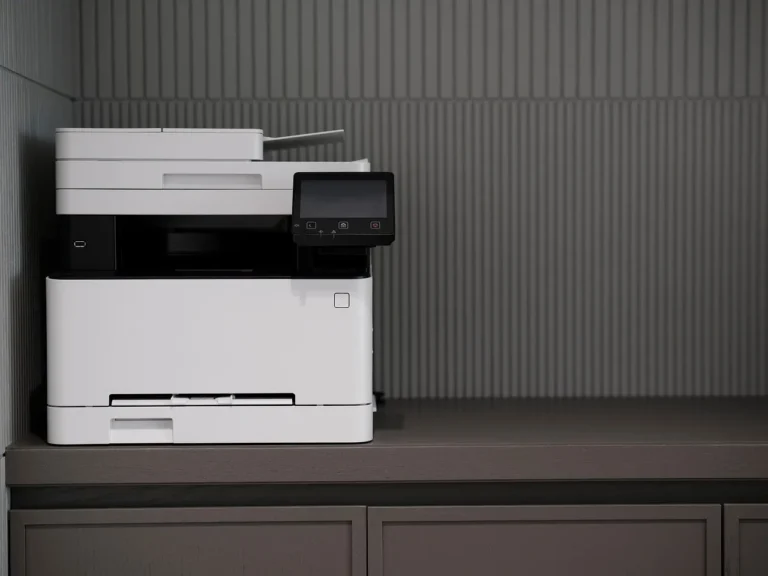
An all-in-one printer, or AIO, combines several office tasks in one machine. The core functions are printing, scanning, and copying. Some models also include fax, which still matters in a few office workflows, but it is not a default feature in every AIO.
That wider feature set is why the category is also called a multifunction printer. PCMag uses that term, and Tom’s Guide summarizes the class as a single printer that can print, scan, and copy. PCMag also notes that AIOs range from compact home units to larger corporate machines.
What the extra functions actually change
The practical benefit is direct: one device can scan a paper form into a file, make a duplicate page, and print from the same footprint. The trade-off is also direct: more functions can mean more parts, more setup steps, and more chances for something to need attention.
Say your household prints a few forms each month, then needs to scan a school form once every few weeks. An AIO can handle both jobs without a separate scanner. If you only print shipping labels or tickets, the extra scan and copy hardware may sit unused.
How is it different from a regular printer?
A regular printer, usually called a single-function printer, only prints. It often costs less up front, can be simpler to set up, and gives occasional users exactly what they need without extra scan or copy hardware. An AIO adds functions, but those functions are only useful if you will use them often enough.
What a single-function printer can and cannot do
A single-function printer is a print-only device. It is generally limited to printing and does not scan, copy, or fax. That makes it a strong fit when your main goal is to put text on paper with as little complication as possible.
Wirecutter says a cheap print-only laser machine can suffice for occasional users. It also says an AIO makes more sense if you do a lot of copying and scanning. That is the cleanest way to think about the choice.
The hidden trade-off
With an AIO, you gain versatility but also add maintenance points. Scanner glass needs cleaning. The ADF may need attention if it starts pulling pages poorly. Fax features, if present, add another layer that many home users will never touch.
With a single-function printer, you usually get a narrower machine to manage. That can matter if you want the fewest settings, the fewest moving parts, and the least setup friction. It also matters when the device will only sit on a shelf and handle occasional jobs.
Space, setup, and maintenance differences
AIOs save space compared with separate printer, scanner, and copier units. That is useful in a home office, dorm room, or shared family desk. But the setup can be more involved because you are configuring more than one function at once.
Wireless connectivity is common in home AIOs, with Wi-Fi, Wi-Fi Direct, and Bluetooth options appearing on many models. PCMag lists Wi-Fi Direct, Bluetooth, Ethernet, USB, and Wi-Fi on one AIO. Wireless is a convenience feature, not a requirement.
When is an all-in-one printer worth it?
An AIO is worth it when you will actually use the scan and copy functions enough to justify the extra cost and complexity. It fits mixed home use, student work, family paperwork, and office-style document handling better than a print-only machine does.
Occasional home users
If you only print a few pages a month, an AIO can be overkill. The same source says a cheap print-only laser machine can suffice for occasional users, and that advice fits people who mainly print forms, labels, or tickets and rarely scan anything.
For this group, the decision often comes down to whether you need any scanning at all. If the answer is no, a single-function printer usually keeps ownership simpler and cheaper.
Students
Students often need to print handouts, scan signed forms, and copy pages from notebooks or course packets. That makes an AIO useful, especially in a dorm or shared apartment where one device can replace several. A compact inkjet AIO is often the most flexible fit for mixed school use.
Still, if the workload is mostly text printing and online submission, a basic printer can be enough. The scanner matters only when you actually need it.
Families
Families tend to create the kind of mixed paper work that favors an AIO: school forms, permission slips, return labels, and occasional photos. Copying is often more useful than people expect, especially when a child needs a duplicate of a form or a household document.
An inkjet AIO is common here because it handles color and photos well. If the family prints a lot, an ink-tank AIO may be the better long-term fit because the running cost is usually lower, though the upfront price is higher.
Small offices
Small offices usually benefit most from an AIO because they scan, copy, and print throughout the day. Fax capability can matter here, but only if the workflow still uses it. A laser AIO often fits this setting because it is faster for text and better suited to higher-volume office-style use.
PCMag’s top laser AIO prints, scans, copies, and faxes, and it includes a 50-page single-pass auto-duplexing ADF. That combination shows why office users often look beyond basic print speed and focus on document handling features.
Printer decision matrix
This table turns the choice into a simple yes-or-no view. “Yes” means the feature or trait is a strong fit for that profile. “No” means it is usually not the best reason to buy that device type for that user.
| Profile | Print volume | Scan frequency | Copy frequency | Photo use | Budget | Space |
|---|---|---|---|---|---|---|
| Occasional home user | Yes — single-function printer | No — single-function printer | No, single-function printer | No, inkjet AIO | Yes, single-function printer | Yes, single-function printer |
| Student | Yes, inkjet AIO | Yes, inkjet AIO | Yes, inkjet AIO | Yes, inkjet AIO | No, ink-tank AIO | Yes, compact AIO |
| Family | Yes, ink-tank AIO | Yes, ink-tank AIO | Yes, ink-tank AIO | Yes, inkjet AIO | No, ink-tank AIO | Yes, AIO |
| Small office | Yes, laser AIO | Yes, laser AIO | Yes, laser AIO | No, laser AIO | No, laser AIO | Yes, AIO |
Which features matter most?
Not every AIO needs every feature. The right feature set depends on how often you handle multi-page documents, whether you print on both sides, and whether the printer will be shared by several people.
Automatic document feeder
An automatic document feeder, or ADF, helps you scan or copy multi-page documents without lifting each page by hand. That matters most if you handle school packets, work forms, or office paperwork often. For occasional users, it is usually less important. (Wikipedia)
PCMag’s top laser AIO includes a 50-page single-pass auto-duplexing ADF, which shows how useful this feature can be for heavy document handling. If you rarely scan more than one page, you do not need to pay extra for it.
Duplexing
Duplexing means two-sided printing, and on some machines it also applies to scanning. It saves paper and time when you print reports, reading packets, or long drafts. For office use, it is a practical feature rather than a luxury.
If your printing is mostly one-page forms or the occasional shipping label, duplexing matters less. If your pages are often double-sided, it becomes a real cost saver over time.
Wireless connectivity
Wi-Fi, Wi-Fi Direct, and Bluetooth make printing easier from laptops and phones. Many home AIOs include one or more of these options, and they are convenient when several people share a printer. They are not required for the printer to do its main job.
If you want the simplest possible setup, USB can be enough. If several devices will print to the same machine, wireless is worth considering because it reduces cable juggling and makes placement easier.
Fax capability
Fax is still useful in some office workflows, but it is rarely a reason to buy a printer for home use. Some AIOs include it, while many do not. If you do not know you need fax, you probably do not need to pay for it.
That is why fax should be treated as optional, not standard. The feature makes sense when document workflows still require it, and not much else.
Inkjet, ink-tank, or laser?
The main AIO types are inkjet, ink-tank, and laser. Each one fits a different workload. The best choice depends on whether you print photos, print a lot of text, or want lower running cost over time.
Inkjet AIOs
Inkjet AIOs are a strong fit for mixed home use. They often handle color well and are a common choice for photos and everyday documents. The trade-off is that ongoing ink cost varies, so running cost can matter more than the sticker price.
Choose inkjet when you want flexibility and better color output for home tasks. It is often the most balanced option for students and families who print in small to moderate amounts.
Ink-tank AIOs
Ink-tank AIOs usually cost more up front, but they come with a large included ink supply and lower running cost. That makes them appealing if you print often and want to reduce replacement frequency over time.
They are often a better fit for households or small teams that print regularly. If your printing is light, the higher purchase price may not pay off soon enough.
Laser AIOs
Laser AIOs are usually the better choice for faster text printing and higher-volume office-style use. They are often more durable, which is why they show up often in small offices and workgroup settings. PCMag also reports a monochrome cost per page of 2.3 cents and a color cost per page of 12.3 cents on one color laser AIO.
That does not mean laser is always cheapest. It means you should compare the running cost with your actual page volume, especially if you print a lot of text and only occasional color.
Frequently asked questions
What does all in one printer mean?
An all-in-one printer means one machine can handle several tasks, usually print, scan, and copy, with fax on some models. It is the same idea as a multifunction printer. The term matters because it tells you whether the device is for printing only or for document handling too.
What can an all in one printer do?
An all-in-one printer can print pages, scan paper into digital files, and make copies. Some models also fax, and some add features such as duplexing or an ADF. The exact mix varies, so you should check the functions that match your daily use instead of assuming every model does everything.
Is an all in one printer the same as a multifunction printer?
Yes. PCMag defines an AIO as a multifunction printer. The two terms are commonly used for the same category. The important point is not the label but whether the machine prints only or also scans and copies.
How is an all in one printer different from a regular printer?
A regular printer usually means a single-function printer, so it prints only. An AIO adds scanning and copying, with fax on some models. That gives you more capability, but also more setup, more upkeep, and sometimes a higher purchase price.
Do I need an all in one printer if I only print occasionally?
Usually no. An all-in-one printer can be overkill for occasional print jobs, and Wirecutter says a cheap print-only laser machine can suffice for occasional users. If you do not scan or copy often, a single-function printer is usually the simpler buy.
Are all in one printers more expensive to maintain?
They can be, because there are more features and sometimes more consumables to manage. Maintenance is not only about ink or toner; it also includes scan hardware, feeders, and setup time. That is why running cost and ownership effort matter as much as the initial price.
When is a single-function printer better than an all in one?
A single-function printer is better when your main need is simple, occasional printing and nothing else. It often has a lower upfront cost in many cases and can be easier to live with. If you never scan or copy, buying those features usually adds cost without adding value.