Best Label Maker for Home Use with Easy-to-read Labels

For most homes, the best label maker for easy-to-read labels is the Brother P-Touch Cube Plus because it prints laminated labels and pairs with a smartphone app. That gives you clear contrast and better moisture resistance for kitchen and bathroom labels. Hard-to-read labels get ignored, relabeled, or replaced. This guide compares handheld, Bluetooth, laminated, and thermal label makers by readability, durability, and ease of use.
Best label maker for home use
The Brother P-Touch Cube Plus is the best overall pick for readable home labels because it prints laminated labels and works over Bluetooth with a smartphone app. That setup fits kitchens, bathrooms, pantry shelves, and storage bins where labels need to stay legible and handle moisture better than basic thermal labels.
The trade-off is simple. If you want the clearest durable label, laminated tape is the safer choice. If you want the quickest stand-alone typing experience, a handheld keyboard model is easier. If you want the lowest upfront price, a direct thermal option is usually cheaper, but it can fade faster in heat and sunlight.
Readability decision table
This table focuses on what makes a label easy to read at a glance: room conditions, how far away you stand, the label material, and the most common failure mode. Use it to match the device to the room instead of buying by price alone.
| Room type | Viewing distance | Best label type | Recommended contrast | Common failure mode |
|---|---|---|---|---|
| Kitchen pantry shelves | Arm’s length to 2 m | Laminated tape | Black on white or other high-contrast dark-on-light text | Small text gets crowded on short jars |
| Bathroom cabinets | Arm’s length | Laminated tape | High-contrast text with plain formatting | Peeling at edges in humidity |
| Closet shelves | 1 m to 3 m | Laminated or durable tape label | Bold, high-contrast text | Labels become hard to scan from farther away |
| Cable tags | Very close range | Thermal or laminated label | Very high contrast, minimal text | Too much text makes the tag cramped |
| Sunny shelf or window-side storage | Arm’s length | Laminated tape | Dark-on-light text | Thermal labels fade in heat or sunlight |
A common first-timer mistake is using a narrow label for a long pantry name, then shrinking the font until it becomes hard to read. If the label is meant to be seen from 1 m away, leave room for larger text and fewer words. Shorter names win.
Checklist for choosing a label type
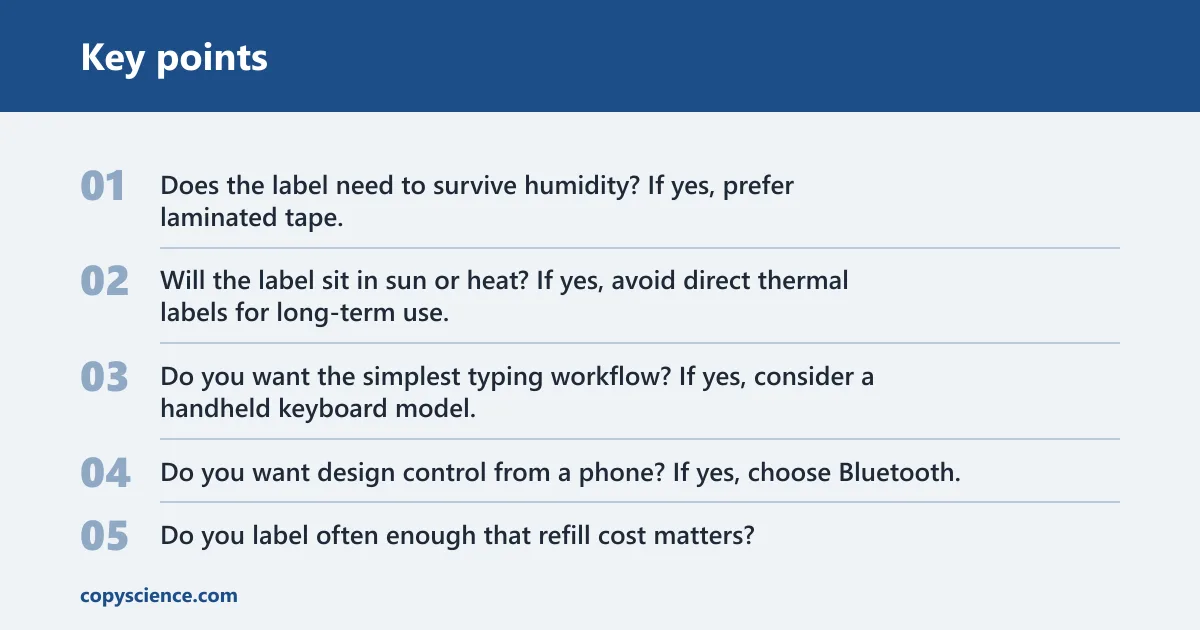
- Does the label need to survive humidity? If yes, prefer laminated tape.
- Will the label sit in sun or heat? If yes, avoid direct thermal labels for long-term use.
- Do you want the simplest typing workflow? If yes, consider a handheld keyboard model.
- Do you want design control from a phone? If yes, choose Bluetooth.
- Do you label often enough that refill cost matters? If yes, check tape availability before buying.
Which labels are easiest to read at home?
Laminated labels are usually easier to keep readable over time because the printed text sits under a plastic protective layer and resists moisture better than plain direct thermal labels. Thermal labels can be fine for short-term or low-moisture jobs, but they can fade in direct sunlight or warm areas. High contrast matters either way.
Laminated labels for kitchens and bathrooms
For kitchens and bathrooms, laminated labels are the safer readability choice because water resistance helps the text stay clean and intact. LabelHQ’s comparison describes laminated labels as water-resistant, which is exactly what these rooms demand. That matters on under-sink bins, soap containers, spice jars, and shelf edges exposed to steam.
Thermal labels for short-term or low-moisture jobs
Thermal labels are useful when you want no ink and a quick print job. The Nelko P21 uses direct thermal labels, which can be convenient for temporary bins, school supplies, or cable tags. The limitation is durability: thermal labels can fade over time in direct sunlight or warm areas, and they are not waterproof by default.
Font size, symbols, and contrast
Readable labels depend on more than the tape. Bigger font sizes help on containers viewed at arm’s length. Simple symbols can help, but too many decorative elements make a label harder to scan. Strong contrast matters most: dark text on a light background is easier to read than pale text on patterned tape.
The Brother PT-D210 gives you 600 symbols and 98 frames, which helps if you want to organize by category without sacrificing clarity. The DYMO LabelManager 160 offers six font sizes and 228 symbols and clip art images, plus a QWERTY-style keyboard for faster typing. More formatting is useful only if the text stays clean.
Do you need a phone or keyboard?
You do not need a phone to make easy-to-read labels, but a phone-based workflow can be better if you want more layout control. Handheld keyboard label makers are usually faster for basic text entry. Bluetooth label makers move the design work to a smartphone app, which can feel slower at first but often gives better formatting control.
Brother P-Touch Cube Plus and Bluetooth workflow
The Brother P-Touch Cube Plus works over Bluetooth with a smartphone app and prints laminated labels. That makes it a compact home-organizing choice for users who want more control over spacing, text layout, and label appearance without learning a desktop program. It is also a good fit when readability and durability matter more than instant typing.
DYMO LabelManager 160 and standalone keyboard workflow
The DYMO LabelManager 160 is a portable handheld label maker with a QWERTY-style keyboard, six font sizes, and 228 symbols and clip art images. That combination makes it easier to type directly on the device. It is a practical option for quick labels on bins, closets, and cables when you do not want to open a phone app.
When a phone-based setup is worth it
Choose Bluetooth if you want a phone-based design workflow and you label the same areas often, such as pantry shelves or bathroom drawers. Choose a keyboard model if your labels are mostly short and functional. For many home users, the phone is worth it when cleaner layout control matters more than speed.
Best label makers for home labeling
The main comparison comes down to the label itself, the typing experience, and how often you will buy tape again. The Brother P-Touch Cube Plus is a strong all-around choice for readable laminated labels. The DYMO LabelManager 160 is the easiest budget handheld for fast direct entry. The Brother PT-D210 is strongest if you want more built-in formatting without a phone.
| Model | Workflow | Readability strengths | Durability notes | Refill notes |
|---|---|---|---|---|
| Brother P-Touch Cube Plus | Bluetooth smartphone app | Clear home labels with laminated tape | Better fit for kitchens and bathrooms | Brother TZe tape is widely available |
| DYMO LabelManager 160 | Standalone keyboard | Fast text entry with six font sizes | Good for general indoor use | Uses DYMO D1 tape; refill availability affects cost |
| Brother PT-D210 | Standalone keyboard | More built-in design options with 600 symbols and 98 frames | Good for labels that need clearer organization | Brother TZe tape is cheaper and more widely available than DYMO D1 tape |
Brother P-Touch Cube Plus: best overall for readable laminated labels
The Brother P-Touch Cube Plus is the best overall pick if readability and room durability come first. It prints laminated labels and works through a smartphone app, so you can build cleaner labels for pantry jars, bathroom bins, and shelf tags. Brother lists it at about $50, which puts it above the cheapest handhelds but still in the home-user range.
DYMO LabelManager 160: best budget handheld with quick text entry
The DYMO LabelManager 160 is the best low-friction handheld choice if you want a portable device with direct typing. Its QWERTY-style keyboard speeds entry, and the six font sizes help you adjust for bins, drawers, and cable labels. DYMO lists it at a regular price of €42.59 on its site.
Brother PT-D210: best standalone option with more formatting
The Brother PT-D210 is the strongest pick if you want a standalone keyboard device with more built-in formatting options. It offers 600 symbols and 98 frames, which makes it useful for home users who want a little more structure without switching to a phone. Walmart lists it at $41.14 with sample tape included.
Say your pantry has short glass jars on a 30 cm shelf. A label with large, plain text and a dark-on-light background will stay readable from arm’s length. A crowded label with small font and decorative frames will not. The problem is usually layout, not the machine itself.
Which tape costs less over time?
Refill cost matters if you label often. Brother TZe tape is an important advantage for P-touch machines because it is cheaper and more widely available than DYMO D1 tape. If you plan to relabel bins, pantry jars, and storage boxes throughout the year, tape access can matter as much as the printer price.
Brother TZe tape and refill value
Brother TZe tape is used by many P-touch machines, including models such as the Brother P-Touch Cube Plus and Brother PT-D210. Wider availability usually means fewer interruptions when you need another roll. That matters for frequent home use, especially if you keep several label widths on hand for bins, shelves, and cable tags.
DYMO D1 tape and ongoing cost
DYMO D1 tape is used by many LabelManager models, including models such as the DYMO LabelManager 160. It comes in multiple widths, which is helpful, but refill availability still affects total cost. If you label only a few items, the difference may be minor. If you label across the whole house, supply access matters more.
Suppose you label ten pantry containers now and another ten next month. The printer price matters less than the cost and availability of replacement tape. A cheaper device can become the pricier choice if the refill you need is harder to find or costs more per roll.
Choose Brother P-Touch Cube Plus if… / Choose DYMO LabelManager 160 if…
Choose the Brother P-Touch Cube Plus if you want the clearest path to durable, easy-to-read home labels in kitchens and bathrooms. Choose the DYMO LabelManager 160 if you want a portable handheld with quick typing and a lower-friction standalone workflow. Choose the Brother PT-D210 if you want more built-in formatting without using a phone.
Choose Brother P-Touch cube plus if…
- You want laminated labels for moisture-prone rooms.
- You prefer a Bluetooth smartphone app for layout and typing.
- You label kitchen and bathroom items often.
- You want Brother TZe tape access for ongoing refills.
Choose DYMO LabelManager 160 if…
- You want a portable handheld label maker with a QWERTY-style keyboard.
- You like quick direct typing on the device.
- You want six font sizes and 228 symbols and clip art images.
- You are comfortable checking DYMO D1 refill availability before you buy.
Choose Brother PT-D210 if…
- You want a standalone keyboard device with more built-in formatting.
- You care about 600 symbols and 98 frames for clearer organization.
- You want a home label maker that stays simple without needing a phone.
- You want access to Brother TZe tape, which is cheaper and more widely available than DYMO D1 tape.
Frequently asked questions
What is the easiest label maker to read at home?
The easiest labels to read at home usually come from the Brother P-Touch Cube Plus because it prints laminated labels that hold contrast well in kitchens and bathrooms. Clear readability depends on high contrast, enough label width for the text, and a layout that avoids crowding. Plain, bold text is easiest to scan.
Should I buy a handheld label maker or a Bluetooth one for home use?
Buy a handheld keyboard model if you want fast typing with no phone app. Buy a Bluetooth model if you want more control over layout and cleaner formatting for shelves, jars, and bins. The Brother P-Touch Cube Plus is the better fit when you want durability and a phone-based workflow.
Are laminated labels easier to read and more durable than thermal labels?
Laminated labels are usually the better long-term choice because the plastic protective layer helps them resist moisture and stay legible indoors. Thermal labels are useful for short-term jobs, but they can fade in direct sunlight or warm areas. For kitchens and bathrooms, laminated labels are the safer read-and-keep option.
Which label maker has the best tape for kitchens and bathrooms?
The Brother P-Touch Cube Plus is the strongest choice for kitchens and bathrooms because it prints laminated labels and uses Brother TZe tape, which is cheaper and more widely available than DYMO D1 tape. That matters when you want labels that keep looking clean on jars, bins, and shelf edges.
Do I need a computer or phone to make easy-to-read labels?
You do not need a computer. A phone is useful with Bluetooth models like the Brother P-Touch Cube Plus, but handheld units such as the DYMO LabelManager 160 and Brother PT-D210 work on their own. The key is not the device you use to type; it is whether the final label has enough contrast and size.
How long do home labels last in humid or sunny rooms?
That depends on the tape type and room conditions. Laminated labels hold up better in humid rooms and are the safer choice for kitchens and bathrooms. Direct thermal labels can fade over time in direct sunlight or warm areas, so they are a weaker fit for window shelves or hot utility spaces.